
What is Aliexpress and how Aliexpress works?
Aliexpress is a globally recognized online retail platform. It was launched in 2010 by Alibaba Group, a Chinese multinational conglomerate.
It serves as a marketplace connecting consumers with a wide range of sellers, primarily from China, offering everything from electronics to fashion at competitive prices.
Unlike Alibaba, which caters more to businesses and wholesale, Aliexpress is tailored for individual consumers.
Is Aliexpress Reliable, Safe, and Trustworthy?
Yes, Aliexpress is generally considered safe and reliable. Like on any online marketplace, it’s important to shop wisely. As there are many different sellers on Aliexpress, here are some factors to consider:
- Product and seller Ratings: Check the ratings and reviews of products to ensure credibility. Ideally, you want high rating, a lot of reviews and a lot of units sold. The more people bought the product the more realistic rating should be. You can also click on “Reviews” to read individual review of each buyer. Here you can find some details that you maybe won’t find in product description
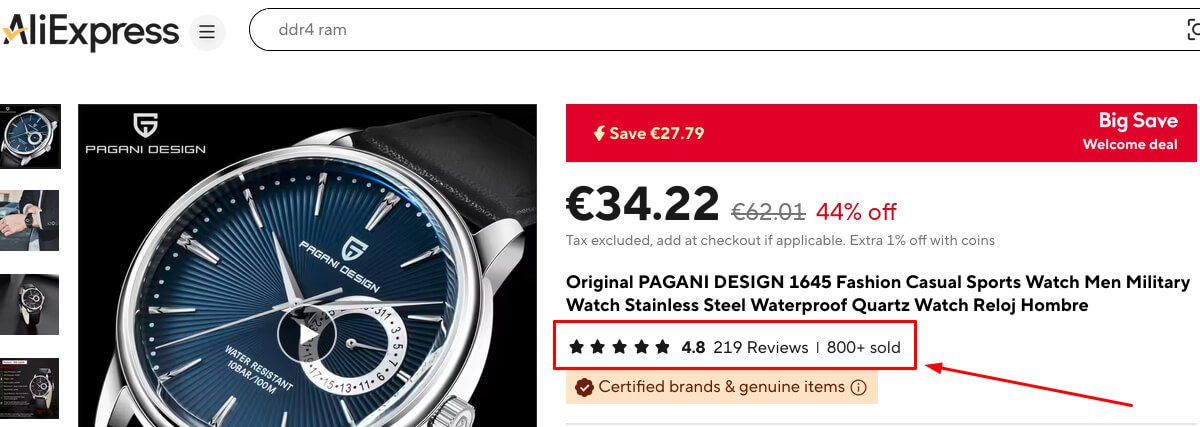
- Buyer Protection: Aliexpress offers a Buyer Protection program, ensuring refunds if items are not delivered or differ significantly from their descriptions.
- Secure Payments: Payments are held in escrow by Aliexpress and only released to sellers after the buyer confirms receipt of the item.
- Counterfeit Goods: Be cautious, as some sellers may offer counterfeit or low-quality items. Always verify product details and seller reputations.
Aliexpress Registration and How to Buy on Aliexpress
- Registration:
- Visit the Aliexpress website or download the app.
- Click on “Sign In / Register” and provide your email address, create a password, or use third-party login options like Google or Facebook.

- Searching for Products:
- Use the search bar or browse categories to find desired items.
- Filter results by price, shipping options, or customer ratings.
- After you click search note that there is “Free Shipping” check box on the left
- Placing an Order:
- Add items to your cart and proceed to checkout.
- Provide your shipping address and choose a payment method.
- Payment:
- Pay via credit/debit card, bank transfer, or other supported payment methods.
- Tracking Your Order:
- Monitor your order status through your Aliexpress account.
Aliexpress Delivery – Time, Costs, Package Tracking and Aliexpress Free Shipping
Best things about Aliexpress are great prices and huge selection of products. Probably the biggest downside is delivery time. You usually wait longer than when you use local online shops in your country.
- Aliexpress delivery Time:
- Aliexpress standard shipping typically takes 15-60 days depending on location.
- Express options like DHL or FedEx may reduce delivery time to 5-15 days.
- Check shipping info and delivery time on product page before buying
- Aliexpress Shipping Costs:
- Shipping fees vary by seller and shipping method. Many items offer free shipping.
- When you select product, check details about shipping costs before you buy the product.
- After making your search you can check “Free Shipping” box to see just items with free shipping.
- Package Tracking:
- Track orders via your Aliexpress account or using the tracking number provided.
- Most of the products have option for package tracking – you can check this info on product page
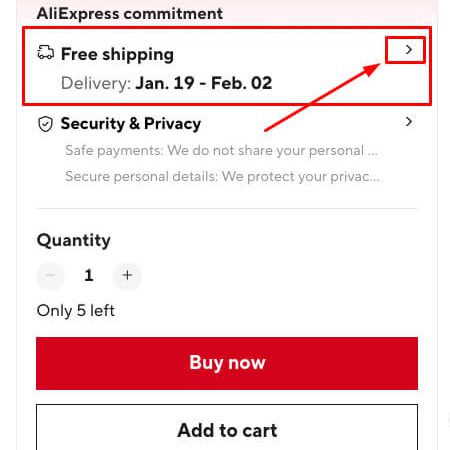
Many sellers on Aliexpress offer free shipping options, often through services like China Post or ePacket. While free shipping is economical, it’s usually slower compared to paid methods. Always check estimated delivery times and shipping details before purchasing.
Aliexpress Coupons, Discounts, and Offers
Aliexpress frequently offers:
- Coupons: Available for new users or during special sales events.
- Discounts: Seasonal and promotional discounts during events like 11.11 (Singles’ Day).
- Flash Deals: Limited-time offers with significant price reductions.
- Coins and Rewards: Earn coins through the app to redeem discounts.
To see all ways to save money on Aliexpress check out coupons and discounts page
Aliexpress Application
The Aliexpress app, available on Android and iOS, provides a user-friendly interface for shopping on the go. Features include:
- Exclusive app-only deals
- Push notifications for discounts
- Easy order tracking
- Enhanced security features
You can download Aliexpress App from Google Play and Apple store.
What Can You Buy on Aliexpress?
Aliexpress offers an extensive range of products, including:
- Electronics: Smartphones, gadgets, accessories
- Fashion: Clothing, shoes, bags
- Home & Garden: Furniture, decor, tools
- Beauty: Cosmetics, skincare products
- Toys: Educational toys, games
- Automotive: Car accessories, tools
Among the most practical products to buy are mobile phone accessories like cases and cables, small home tools, home decorations, and seasonal fashion accessories.
These products often have affordable prices, free shipping options, and quality that meets everyday needs.
In Which Languages, Countries and Currencies is Aliexpress Available?
AliExpress supports a wide range of languages, countries and currencies.
Aliexpress usually automatically sends you to your local page. If this is not the case you can easily set up your preferences from main menu:
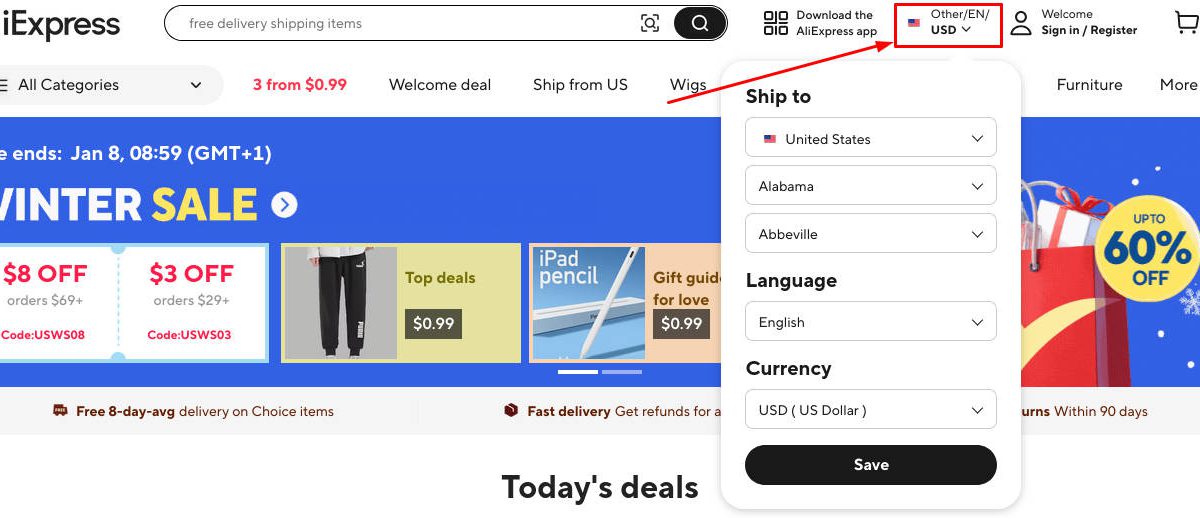
Aliexpress supports multiple languages, including:
- English
- Spanish
- Russian
- French
- German
- Portuguese
- Italian
- Polish
- Korean
- and more
You can switch languages in the website or app settings.
The platform accommodates over 180 different currencies, including major ones like the US Dollar (USD), Euro (EUR), British Pound (GBP), and many others.
Aliexpress is available in almost all countries and is particularly popular in:
- Brazil – Brazilian Real (BRL)
- Russia – Russian Ruble (RUB)
- United States – US Dollar (USD)
- Spain – Euro (EUR)
- France – Euro (EUR)
- India – Indian Rupee (INR)
- Germany – Euro (EUR)
- Poland – Polish Złoty (PLN)
Its affordability and global reach make it appealing worldwide.
Please note that while you can view prices in various currencies, the default payment currency on AliExpress is the US Dollar (USD). This means that even if you select a different currency for display, the final transaction may be processed in USD, and your bank or payment provider will handle the currency conversion.
Be aware that currency conversions by banks or payment providers might include additional fees or use less favorable exchange rates. To potentially minimize costs, some users prefer to make purchases in USD, depending on their bank’s policies and conversion rates.
It’s advisable to check with your bank or payment provider regarding any additional fees or exchange rates applied to international transactions to make an informed decision when shopping on AliExpress.
Sites Like Aliexpress
If you’re looking for alternatives to Aliexpress, consider:
- Temu – A user-friendly platform with low prices and free shipping.
- Banggood – Ideal for tech enthusiasts and gadget lovers.
- DHgate – A great option for bulk purchases and wholesale deals.
- Gearbest – Focused on electronics and innovative gadgets.
- Shein – Known for trendy and affordable fashion.
- LightInTheBox – Offers customized and diverse product selections.
- Wish – Ultra-low prices with a mobile-first approach.
- Tomtop – Popular for gadgets and home décor.
- Joom – Budget-friendly shopping with free shipping options.
- Zaful – Specializes in stylish, budget-friendly fashion.
- Alibaba – The ultimate destination for wholesale and bulk orders.
Alibaba and Aliexpress – Alibaba AliExpress Difference
- Alibaba: Caters primarily to B2B buyers and often requires bulk purchases.
- Aliexpress: Focuses on individual consumers with no minimum order requirements.
- Payment Methods: Alibaba typically involves negotiations and bank transfers, while Aliexpress supports credit cards and online payments.
Aliexpress PayPal
As mentioned before, Aliexpress is platform that has many sellers on it.
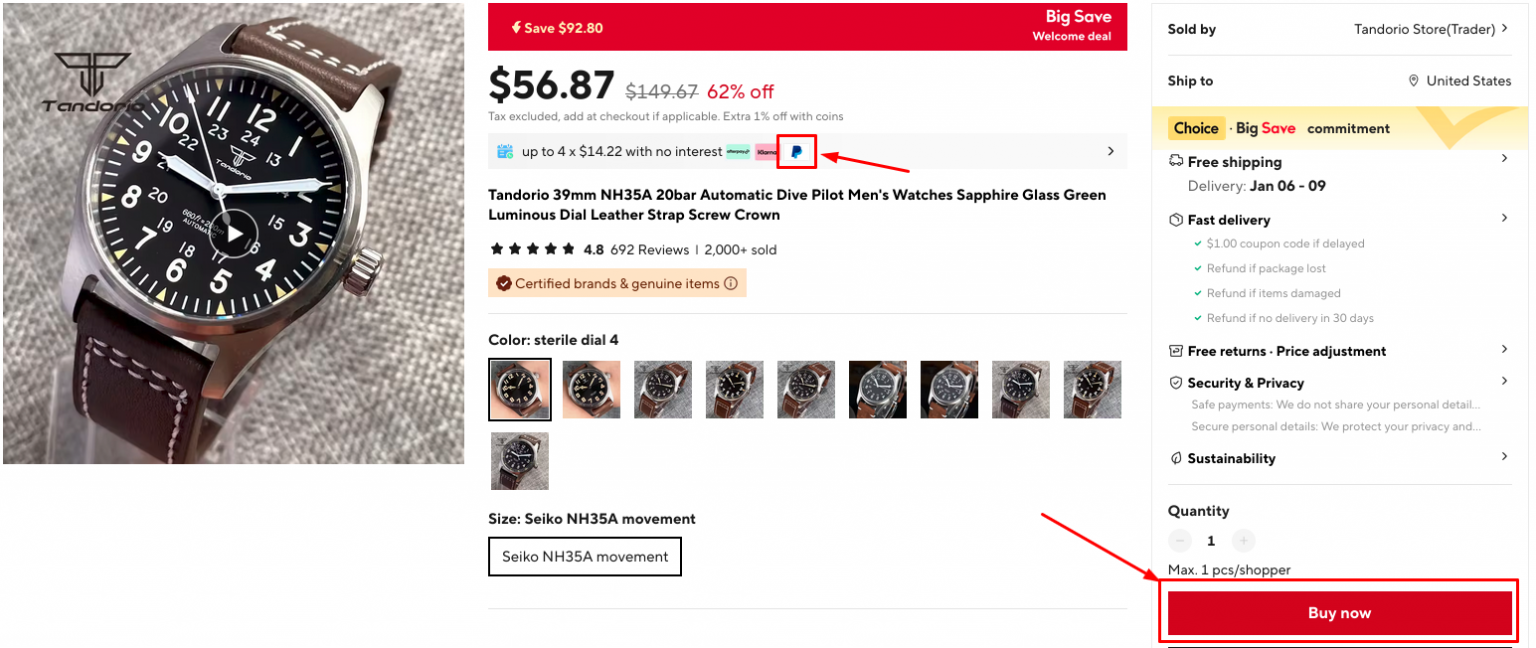
Some sellers on Aliexpress support PayPal as a payment method, while others don’t.
When you checked reviews and selected the product clcik “Buy now”. Here you can see all the available payment options and if PayPal is amongst them Sellers sometimes put info about payment methods on the product page, but if that is not the case, you can find this info after clicking “Buy now”
Tips for Buying on Aliexpress
- Research Sellers: Check seller ratings, reviews, and feedback from previous buyers to ensure credibility.
- Understand Product Details: Carefully read descriptions, specifications, and check customer photos to ensure the product meets your expectations.
- Use Filters: Apply filters for price range, shipping options, and top-rated sellers to narrow your search.
- Communicate with Sellers: If in doubt, ask sellers questions through the messaging feature for clarification on product details or delivery times.
- Track Your Order: Use the tracking number provided to monitor the status of your shipment.
- Secure Payment Methods: Always use the Aliexpress platform for transactions to benefit from Buyer Protection.
- Look for Deals: Utilize coupons, discounts, and seasonal sales to maximize savings.
Aliexpress remains a go-to platform for affordable and diverse shopping options, but it’s essential to shop carefully and make use of available buyer protections for the best experience.